
Upgrade Workflow
Edit on GitHubAvailability
The spryker-upgrade skill is available from spryker-sdk/ai-dev version 0.6.4, which ships version 0.4.0 of the spryker-ai-dev-sdk plugin. Plugin version 0.7.0 adds the tooling alignment and the performance fixes. Plugin version 0.8.0 adds the security fixes, the release steps check, and the handover report, and supports GitHub Copilot.
To update the plugin, run /plugin in Claude Code and update spryker-ai-dev-sdk from the spryker-plugins-official marketplace. In GitHub Copilot, run copilot plugin update spryker-ai-dev-sdk@spryker-plugins-official. For installation instructions, see Installation.
What the skill does
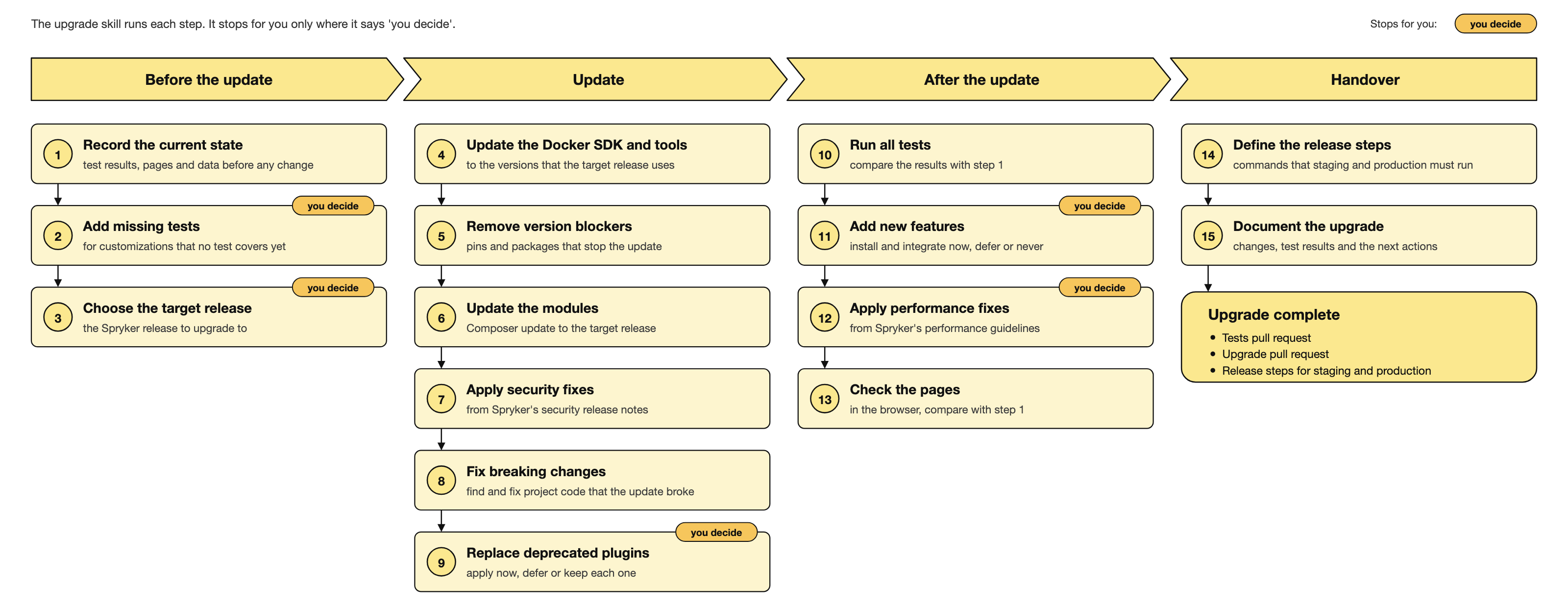
spryker-upgrade upgrades your project’s modules and features to a newer Spryker release. It is built for projects with heavy src/Pyz customization, where the dangerous part of an upgrade is not the code that stops compiling but the code that keeps running while doing nothing.
The skill combines an orchestrated workflow with a set of deterministic detector scripts. Each script is a standalone CLI that runs on host PHP using reflection or static parsing only, with no Spryker bootstrap — so they also work in CI.
Invoke it with “upgrade the project”, “update to the latest release”, or any request to bump spryker-feature/* or spryker/* packages.
For the full flow, the design decisions, and the known limits, see the spryker-upgrade README in the plugin repository.
Why silent damage is the real problem
Everything a Spryker project overrides fails quietly when core moves. A dead override still loads, a replaced plugin stack still boots, and a stale template still renders. Nothing errors — the customization simply stops taking effect.
The workflow therefore starts with a different question than “which modules changed”. It asks which of your customizations would notice if they stopped working, and whether the upgrade can be verified at all.
The phases
- Preflight and baselines — boots the project before the upgrade and records snapshots of overrides, shadowed frontend files, constants, the Back Office pages, and the storage and search tables. It also records the existing test, PHPStan, and code style results, so that existing damage is not attributed to the upgrade.
check-baselines.phpblocks the next phase until all baselines exist. - Coverage check — measures your override surface against the tests that cover it, and offers to write characterization tests for the gaps. These must be written before the upgrade; written afterwards they pin the upgraded behavior and can no longer detect that it changed.
- Target selection — reads the installed state from
composer.lock, and reads the security release notes that Spryker published after the starting release. - Tooling, Docker SDK, and deploy files — updates the Docker SDK, the deploy files, and the developer tools (PHPStan, the evaluator, the code sniffer, Codeception) to the versions of the reference demo shop of the target release, each as its own commit.
- Constraint resolution — relaxes patch-locked constraints, then resolves conflicts iteratively. Conflicts arrive in waves, each root bump revealing the next transitive layer.
- Composer update — runs a full update in the container, then applies the security fixes. See Security fixes.
- Detection — after Composer completes, runs the detectors that find the silent damage.
- Resolution — merges shadowed files, rewires replaced plugin stacks, fixes broken configuration references, and requires a migration guide for every major module bump.
- Boot and verify — boots the upgraded project, compares the storage and search tables with the baseline, regenerates the artifacts, and runs the full test suite in the booted environment.
- New features — lists the new packages and the new capabilities of existing modules. You decide for each one: integrate now, defer, or never.
- Performance fixes — checks the project against Spryker’s performance guidelines. See Performance fixes.
- Page checks — checks the pages of the upgraded project in the browser.
- Release steps — finds the commands that staging and production must run after the normal deployment. See Release steps.
- Reports — writes a report for the developer and a handover report for the development team. See Reports.
The upgrade comes as two pull requests: the tests pull request first, then the upgrade pull request, which starts from it. Without new tests, there is only the upgrade pull request.
What the detectors find
| Detector | Damage it catches |
|---|---|
check-test-coverage.php |
Customizations with no test over them, ranked by risk, with the test type that would catch each gap |
check-vendor-class-replacement.php |
Project files that declare a vendor namespace and replace a core class outright, so the vendor implementation never loads |
check-constraint-style.php |
Patch-locked or exactly pinned constraints that make a feature bump unresolvable |
check-typed-members.php |
Untyped overrides of constants and properties that core has since typed — a fatal on class load that aborts the console itself |
check-dead-overrides.php |
Project methods overriding a vendor method that the new version deleted, so the project logic stops being called |
twig-shadow-map.php |
Shadowed Twig, SCSS, and TypeScript files whose vendor counterparts changed upstream |
merge-shadowed-files.php |
Runs a three-way merge for every shadowed file and sorts the outcomes into clean, identical, conflicted, and removed |
check-plugin-usage.php |
Vendor plugins that are missing or deprecated after the upgrade, and project plugins implementing a removed interface |
check-config-constants.php |
Configuration referencing a vendor constants interface or constant that no longer exists, which breaks bootstrap of every application |
list-major-bumps.php |
Every major module bump, with a documentation search URL, changelog URL, and compare URL per package |
check-baselines.php |
Missing baselines before the upgrade starts, so every later comparison has something to compare with |
check-added-comments.php |
Explanatory comments and suppressions (@phpstan-ignore, eslint-disable, and others) added since the upgrade began |
check-platform-alignment.php |
A lock file resolved on a host that does not match the project’s image, and would not install there |
check-tooling-alignment.php |
Developer tools, the Docker SDK version, and the deploy files that do not match the reference demo shop of the target release |
check-constant-overrides.php |
Project constants that override a vendor constant whose value changed in the new version |
check-legacy-css-classes.php |
Legacy CSS classes that the vendor code still renders or selects |
storage-search-counts.php |
Storage and search tables that lost rows after the same import, compared before and after the upgrade |
backoffice-smoke.php |
Back Office navigation pages and table data endpoints that no longer answer — a vendor-to-vendor conflict can break many pages that the upgrade did not touch |
check-performance.php |
Performance guideline pages without a recorded fix or a reason, and fixes without a size, a status, or the developer’s decision |
resolve-constraints.php |
Runs Composer, parses root conflicts, raises the constraints the tree demands, and repeats |
unpin-feature-driven-modules.php |
Breaks a cohort deadlock, where a group of modules sharing a dependency must move together |
The detectors keep their snapshots and reports in .spryker-upgrade/state/ inside the project, created self-gitignoring on first use.
The dependency between the detectors is real. The skill runs them in the correct order — coverage and replacement checks first, then baselines and constraint preflight, then resolution, then post-Composer detection. Running them out of order wastes time on phantom findings.
Security fixes
The skill reads the security release notes that Spryker published after the starting release — for example, Security release notes 202610.0. For each issue, it checks the installed module version in composer.lock:
- The module is below its fixed version — the skill raises the module’s constraint to the fixed version and updates it, as its own commit. When that does not resolve, the skill gives the developer the output of
composer why-not. - The fix needs extra steps — a module update alone does not always fix an issue. The skill applies the code and configuration steps as their own commit. Steps for the environments go into the release steps.
- The project overrides a file that the fix changed — the skill does not change the override, because that can change the shop’s behavior. The report lists the issue as not fixed, with the recommended fix for that file.
When the release notes cannot be read, the reports say that the security fixes are not checked.
Performance fixes
The skill reads Spryker’s performance guidelines as published on the day of the upgrade. For each guideline page, it records the fixes that apply to the project, or the reason why none applies. Each fix gets a size:
- S — a configuration value or a flag. The skill applies it without asking.
- M — a package update or a change in a few files.
- L — a refactoring, a schema change, or a change in many files.
For the M and L fixes, you decide once for each fix: apply now, defer, or skip. A fix that changes the shop’s visible behavior is not applied; the report lists it as a recommendation. The skill applies one fix at a time, as its own commit, and reverts it when the checks fail. The deferred fixes go into the report’s performance backlog.
Release steps
Through the whole upgrade, the skill writes each release action into a log: a migration, an environment variable, a one-time command, a new job, or an action that a guide names — a migration guide, the integration guide of a new feature, a performance fix, or a security release note.
Then it checks the log locally. It deploys the upgrade branch onto a copy of the production state with only the normal deployment commands, and compares the result with a fresh installation of the upgrade branch. The database, Redis, and the search engine are compared. Each difference that a command fixes becomes a release step. Before the check, the skill asks which branch production runs, which commands the deployment runs, and whether it may reset the local data.
Reports
The skill writes two reports in .spryker-upgrade/state/:
- The developer report — for the person who ran the upgrade: what is verified, what has not failed yet, the tests that were already red before the upgrade, the replaced deprecated plugins, and the performance fixes.
- The handover report — for the development team that reviews, releases, and owns the result. The skill asks once for the format: Markdown, or HTML to paste into Confluence. It contains:
- An executive summary: the goal, what was done, the changes in behavior, the security fixes, and what happens next.
- Technical details: the pull requests, the upgrade per area, the behavior changes from replaced deprecated plugins, the database migrations, and the security fixes.
- Action items for the development team: the review, the local environment, the release steps for staging and production, and what was not done in this upgrade.
- The existing issues found during the upgrade, the performance guideline check, and the new Spryker features that the project can adopt.
Run the detectors in CI
Two detectors are cheap enough to gate every pull request, and both catch damage that is otherwise invisible until runtime:
php $UP/check-typed-members.php     # fatals on class load
php $UP/check-plugin-usage.php      # missing plugins
Neither needs a snapshot, a database, or a search backend — only an installed vendor/ directory. Failing the build on exit code 1 turns “the Back Office returns 500 after deploy” into a red pipeline.
For dependency-bumping pull requests, also wrap the change in a snapshot and verify pair for check-dead-overrides.php and twig-shadow-map.php, because those compare against pre-upgrade state and cannot work from a single point in time.
You can also gate check-test-coverage.php in CI, but gate it on a ratchet rather than on zero: fail when a pull request increases the number of untested overrides. New customization then arrives with a test, instead of the project needing a coverage project before anyone can merge.
Known limits
No detector covers Propel schema merges, glossary keys, ACL and navigation for new Back Office routes, or pure behavioral change. Those remain process gates and tests, and the skill marks them as such.
Published migration guides are also sometimes stale or absent, so the skill treats the tag diff, not the guide, as the source of truth.
Requirements
- A Spryker project with Composer installed, and host PHP available to run the detector scripts
- A running Docker environment of the project (
docker/sdk) - An AI tool with the SDK’s skills loaded — either through the plugin in Claude Code or GitHub Copilot CLI, or via
ai-dev:setupfor another supported tool. See Installation.
Thank you!
For submitting the form